

DFIR Training Scenarios
Plan your DFIR scenarios and find the right resources to create evil.
There are many ways to create DFIR training scenarios and create evil. You could execute malware or simulate malicious user behavior on a single, isolated system. Alternatively, you could create a more advanced scenario that includes a lab environment, multiple hosts, and a cyber incident scenario. The complexity of the attack will depend on the offensive efforts and skills of the user, but advanced hacking skills are not required for diving deeper into performing DFIR investigations.

You can learn a great deal by investigating normal user behavior on a Windows system. Gaining knowledge of system internals and common forensic artifacts – and using tools to investigate those – is the first step to getting started in digital forensics. Once you feel confident there, you will be ready to dive into more complex scenarios.
Attack & Malware Resources
For further inspiration on performing an attack and learning how to investigate such an event, the well-known and industry-wide accepted MITRE ATT&CK™ framework can be used. This framework provides a comprehensive matrix of known attacker tactics and is a great way to become familiar with common threats.
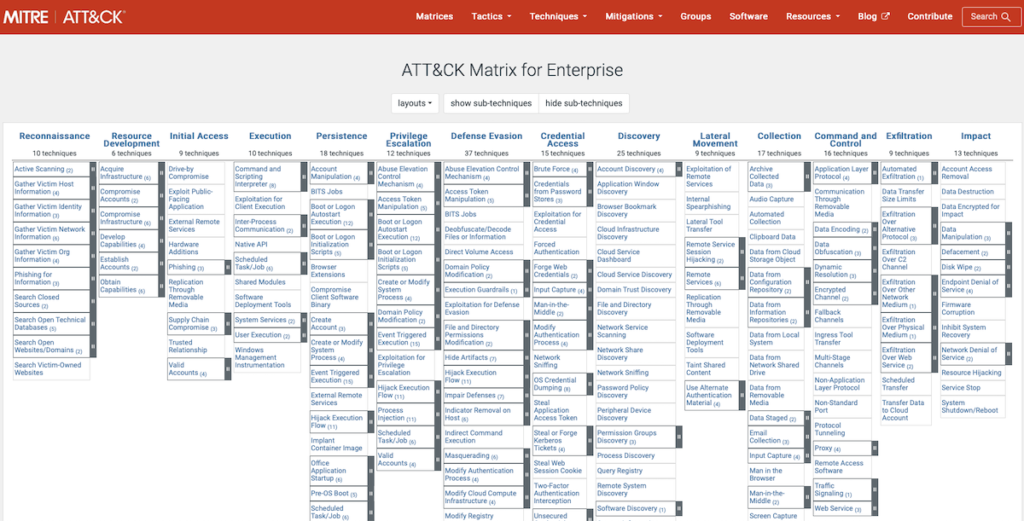
This framework also provides a comprehensive list of commonly-used software by threat actors. Becoming familiar with this kind of software and using it in a DFIR scenario can make the exercise as realistic as possible. The framework even describes the usage of a certain tool by threat actors: see MITRE ATT&CK list of software
The section below describes several commonly-observed tools in real world incidents and relevant resources available.
Malware Samples
There are many websites that provide malware samples for download. Here are a few favorites:
- MalwareBazar (free samples)
- Any.run (registration for download)
- theZoo (free samples)
Modern-day malware is typically quite sophisticated and may not fully execute when it detects that it is running within a test environment. One option for avoiding this problem is to look for older variants that are well documented on various malware analysis blogs (blogs which can also be used as a guide during the investigation).
Attack Tools
Advanced attacks can be carried out by using purpose-built frameworks. However, attackers often choose to use legitimate administration software, such as Sysinternals tools, to blend in. This is also called living-off-the-land or “LOL”. The list below includes commonly-observed frameworks and tools that are available for free:
- Atomic Red Team (Attack simulation framework)
- Metasploit (Attack framework)
- Powersploit (Attack framework)
- CobaltStrike (Attack framework – free trial)
- PowerShell Empire (Attack framework)
- PsExec (Sysinternals, Remote Execution)
- CMD.exe, PowerShell & WMI (Windows native, Execution)
- RDP & SMB (Windows native, Remote Services)
- Quasar (Remote access)
Scenario Considerations
Depending on the lab setup, a DFIR scenario and the evil created within, should enable training one or multiple DFIR skillsets. These can be fairly broad, including but not limited to:
- Disk forensics
- Memory forensics
- Network analysis
- Analysis and correlation of various logs
- Malware analysis
- IT enterprise and server administration
- Coding & scripting
- Threat intelligence
Basic DFIR Scenarios
For basic scenarios, you can start by simulating normal user behavior over a certain period of time. Depending on the focus of the forensic analysis, you can download and execute benign or malicious (be careful!) software that may be interesting for analysis and/or just create, copy, move, and delete files.
Email and browser activity can also be a common area of interest. This allows for investigating a number of forensically-interesting artifacts such as user logons, file timestamps, browsing history, email logs, installed and running services, persistence mechanisms, etc. Many times investigations do not involve malicious software per se, but instead focus on retracing historic user activity.
Once you have gained basic knowledge in this area, you can step up the game and include network activity and ‘living off the land’ (LOL) tools as discussed above. LOL tools include RDP, Powershell, WMIC, Sysinternals, TeamViewer, etc.
Advanced DFIR Scenarios
For simulating advanced DFIR scenarios, a lab environment should consist of a basic Windows enterprise domain that includes a domain controller using Active Directory incl. domain users, administrators, and one or more Windows hosts. Furthermore, to mimic a realistic security operations environment, firewalls, IDS/IPS, SIEMs, and EDR solutions may be added.
This type of setup allows for simulating realistic attacks, such as lateral movement, privilege escalation, data exfiltration, etc., and investigating these attacks along various phases of the incident response process.
By working with an advanced scenario, you will be able to learn a great deal – not just within the realm of DFIR, but also about Windows administration and hacking. For a well-rounded security professional, this is a desirable mix of skills.
Next Steps
Congratulations! Prepared with a forensic workstation, target system(s), and resources for creating attacker tracks by using malware and attack frameworks, you are ready to test the process.
- Prepare your target (the victim) system and ensure you have a snapshot.
- Perform some malicious user behavior e.g. by browsing the web and downloading malicious tools.
- Disable the network interface and start monitoring tools.
- Execute the malicious tools and observe what happens.
- Take a snapshot.
- Capture the memory dump – either by using DumpIt.exe within the VM, or by exporting the memory file via your hypervisor solution.
- Export the disk image via your hypervisor solution.
- Start your forensic workstation and start investigating the memory (Volatility) and disk image.
This process can be repeated many times by switching up the attack and the tools you use. Once you are ready for the next step, you may want to build a lab environment that includes multiple systems for advanced DFIR investigations: