
For hunting threats both proactively and reactively, the ability to create fast, reliable detections is one of the most critical skills in a defender’s toolkit. Sigma rules sit at the center of that capability — a vendor-neutral, open standard for writing detection logic once and deploying it anywhere. If you’re not already writing them, Sigma is worth understanding.
Sigma is a generic, open, and structured detection format that allows security teams to detect relevant log events in a simple and shareable way.
In this post we’ll walk through a real-world example: detecting credential dumping via LSASS memory access. We’ll build a detection from first principles, tune out the noise, validate it on raw Windows event logs, and then run the final query against Splunk telemetry.
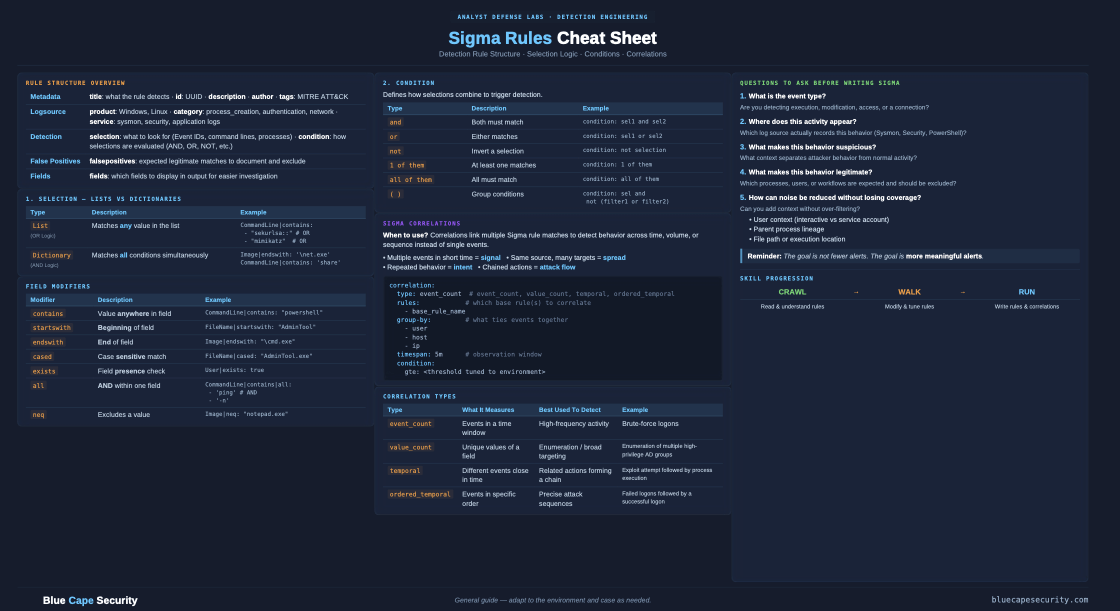
Before we get into it — if you want a quick reference to keep open while you work, we put together a free Sigma cheat sheet covering rule structure, condition logic, field modifiers, and log source categories. Grab the free PDF here
First: Understand the Sigma Rule Structure
Before we dive into the example, here’s the basic anatomy of a Sigma rule. It’s intentionally human-readable:
title: Example Detection Rule
status: experimental
description: Detects suspicious process access behavior
logsource:
  product: windows
  category: process_access
detection:
  selection:
    EventCode: 10
    TargetImage|endswith: '\lsass.exe'
  filter:
    SourceImage: 'C:\Windows\system32\svchost.exe'
  condition: selection and not filter
Three key sections: logsource (where to look), detection (what to match), and condition (the logic that ties them together). That’s all you need to get started.
Test It: Validate Against Windows Event Logs with Hayabusa
Before deploying a rule to a SIEM, you want to validate it against real log data on the command line. Hayabusa is a fast, open-source Windows event log forensics and threat hunting tool that runs Sigma rules directly against .evtx files.
hayabusa csv-timeline -d ./evtx-logs/ -r ./sigma-rules/ -o results.csv
That’s it. Point it at a folder of event logs and a folder of Sigma rules, and it outputs a timeline of hits. No SIEM required. It’s the fastest way to iterate on a rule — write it, run it, see what fires, tune, repeat.
The LSASS Dumping Problem
Now onto the detection itself.
LSASS (lsass.exe) is the Local Security Authority Subsystem Service — it holds credential material for all logged-on users in memory. Dumping its memory is one of the most common techniques attackers use to harvest credentials for lateral movement.
One technique shows up constantly in real incidents: abusing rundll32.exe with comsvcs.dll to produce a full LSASS memory dump using nothing but built-in Windows components.
rundll32.exe C:\Windows\System32\comsvcs.dll, MiniDump <lsass_pid> C:\output.dmp full
No external tools. No Mimikatz on disk. Just a signed Microsoft binary calling a built-in DLL export — and you have a dump of LSASS memory ready to process offline.
Understand GrantedAccess
Sysmon Event ID 10 (ProcessAccess) captures when one process opens a handle to another. The GrantedAccess field tells you exactly what permissions were requested. This is your primary signal.
Here’s the noise reality: LSASS gets opened by dozens of legitimate system processes constantly. The key is knowing which access masks are dump-capable and which aren’t.
| GrantedAccess | Significance |
|---|---|
0x1fffff |
PROCESS_ALL_ACCESS — full handle, almost never legitimate from a non-system process |
0x1438 |
Memory access + process manipulation — common in credential dumping tools |
0x1410 |
Controlled memory read — used by stealthier variants |
0x1010 |
PROCESS_VM_READ + PROCESS_QUERY_LIMITED_INFORMATION — the comsvcs.dll MiniDump signature |
0x1010 is the one to focus on here. It’s exactly what comsvcs.dll MiniDump requests against LSASS — just enough access to read the process memory and produce a dump, nothing more. Stealthy, but detectable.
The second thing to look at beyond the access mask: who is requesting it? A standard domain user account opening a handle to LSASS with dump-capable permissions is immediately anomalous. That’s not a tuning problem — that’s a high-confidence signal.
Tune Out the False Positives
A naive rule matching all 0x1010 access to LSASS would be buried in noise. Dozens of legitimate system processes open LSASS regularly with similar masks — AV, WMI, task scheduler, the Sysmon driver itself.
The filter section handles this:
filter_legitimate_system:
  SourceImage:
    - 'C:\Windows\system32\lsass.exe'
    - 'C:\Windows\system32\wininit.exe'
    - 'C:\Windows\system32\services.exe'
    - 'C:\Windows\system32\svchost.exe'
    - 'C:\Windows\system32\csrss.exe'
    - 'C:\Windows\system32\winlogon.exe'
    - 'C:\Windows\system32\taskhostw.exe'
    - 'C:\Windows\system32\taskhost.exe'
    - 'C:\Windows\system32\wbem\wmiprvse.exe'
    - 'C:\Windows\system32\msiexec.exe'
    - 'C:\Windows\Sysmon.exe'
    - 'C:\Windows\Sysmon64.exe'
    - 'C:\Windows\System32\atiesrxx.exe'
    - 'C:\Windows\System32\CompatTelRunner.exe'
    - 'C:\Windows\System32\nvwmi64.exe'
    - 'C:\Windows\System32\taskmgr.exe'
    - 'C:\Windows\System32\lsm.exe'
    - 'C:\Windows\System32\MRT.exe'
This list isn’t exhaustive — your environment will have additional legitimate sources (EDR agents, backup software, endpoint management tools). The process of building this filter list is the detection engineering work. You learn your environment by tuning your rules.
The Final Sigma Rule
With the access masks defined and the false positive filter in place:
title: Potential LSASS Memory Dump
id: 6fbd07cf-a53f-403d-9219-df65a6d59efc
status: experimental
description: Detects Credential Dumping from LSASS
author: BlueCapeSecurity
tags:
  - attack.credential_access
  - attack.t1003.001

logsource:
  product: windows
  category: process_access

detection:
  selection_lsass_access:
    EventCode: 10
    TargetImage|endswith: '\lsass.exe'
    GrantedAccess:
      - '0x1fffff'
      - '0x1438'
      - '0x1410'
      - '0x1010'

  filter_legitimate_system:
    SourceImage:
      - 'C:\Windows\system32\lsass.exe'
      - 'C:\Windows\system32\wininit.exe'
      - 'C:\Windows\system32\services.exe'
      - 'C:\Windows\system32\svchost.exe'
      - 'C:\Windows\system32\csrss.exe'
      - 'C:\Windows\system32\winlogon.exe'
      - 'C:\Windows\system32\taskhostw.exe'
      - 'C:\Windows\system32\taskhost.exe'
      - 'C:\Windows\system32\wbem\wmiprvse.exe'
      - 'C:\Windows\system32\msiexec.exe'
      - 'C:\Windows\Sysmon.exe'
      - 'C:\Windows\Sysmon64.exe'
      - 'C:\Windows\System32\atiesrxx.exe'
      - 'C:\Windows\System32\CompatTelRunner.exe'
      - 'C:\Windows\System32\nvwmi64.exe'
      - 'C:\Windows\System32\taskmgr.exe'
      - 'C:\Windows\System32\lsm.exe'
      - 'C:\Windows\System32\MRT.exe'

  condition: selection_lsass_access and not filter_legitimate_system

fields:
  - _time
  - SourceImage
  - GrantedAccess
  - SourceUser
  - ComputerName
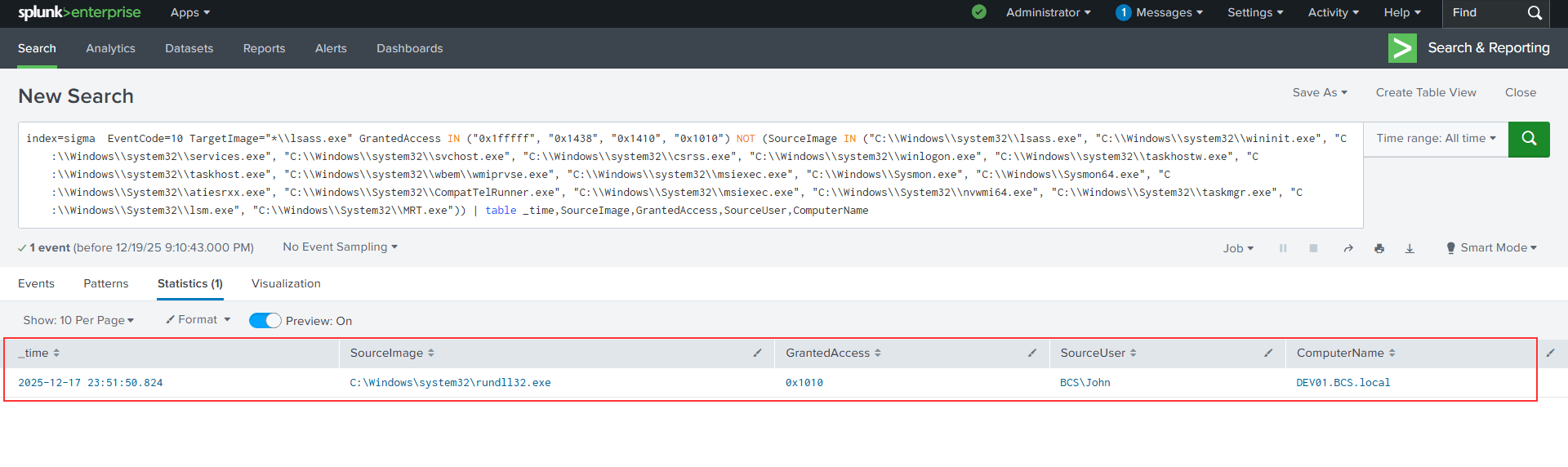
Convert that to SPL and run it across your Splunk environment:
index=sigma EventCode=10 TargetImage="*\\lsass.exe"
GrantedAccess IN ("0x1fffff", "0x1438", "0x1410", "0x1010")
NOT (SourceImage IN ("C:\\Windows\\system32\\lsass.exe",
"C:\\Windows\\system32\\wininit.exe",
"C:\\Windows\\system32\\services.exe",
"C:\\Windows\\system32\\svchost.exe",
"C:\\Windows\\system32\\csrss.exe",
"C:\\Windows\\system32\\winlogon.exe",
"C:\\Windows\\system32\\taskhostw.exe",
"C:\\Windows\\system32\\taskhost.exe",
"C:\\Windows\\system32\\wbem\\wmiprvse.exe",
"C:\\Windows\\system32\\msiexec.exe",
"C:\\Windows\\Sysmon.exe",
"C:\\Windows\\Sysmon64.exe",
"C:\\Windows\\System32\\atiesrxx.exe",
"C:\\Windows\\System32\\CompatTelRunner.exe",
"C:\\Windows\\System32\\nvwmi64.exe",
"C:\\Windows\\System32\\taskmgr.exe",
"C:\\Windows\\System32\\lsm.exe",
"C:\\Windows\\System32\\MRT.exe"))
| table _time,SourceImage,GrantedAccess,SourceUser,ComputerName
Here’s what a match looks like in Splunk:
Analyzing the Hit: Why This Is Malicious
When this rule fires, you need to know what you’re actually looking at. Here’s a real Sysmon Event 10 from a lab environment that this rule caught:
SourceImage:    C:\Windows\system32\rundll32.exe
TargetImage:    C:\Windows\system32\lsass.exe
GrantedAccess:  0x1010
SourceUser:     BCS\John
TargetUser:     NT AUTHORITY\SYSTEM
CallTrace:      ntdll.dll+9c264|KERNELBASE.dll+29c6e|UNKNOWN(0000019BC8FDD97C)
Walk through the indicators:
GrantedAccess 0x1010 breaks down as PROCESS_VM_READ (0x0010) + PROCESS_QUERY_LIMITED_INFORMATION (0x1000). That combination is exactly what’s needed to read LSASS memory and produce a credential dump — nothing more, nothing less.
rundll32.exe as the source is a classic LOLBin pattern. It’s signed by Microsoft, it’s present on every Windows system, and it can execute arbitrary DLL exports — including comsvcs.dll’s MiniDump function. Attackers use it precisely because it blends into normal process telemetry.
BCS\John as the source user is the clearest anomaly. A standard domain user account should never be opening handles to LSASS. Legitimate processes that access LSASS run as SYSTEM or specific service accounts. A named user account here is immediately suspicious regardless of the tool involved.
The CallTrace is the forensic confirmation:
ntdll.dll | KERNELBASE.dll | UNKNOWN(0000019BC8FDD97C)
The first two frames represent the normal OpenProcess call chain. The third — UNKNOWN at a specific memory address — is an unbacked memory region. No mapped image on disk. This is the signature of comsvcs.dll executing MiniDump from heap memory, or a reflectively loaded module. Legitimate tooling produces a fully resolved call stack with named DLLs all the way up.
From a single event, this is high-confidence credential dumping. The next pivot points would be:
- Event ID 1 (Process Create) for the
rundll32.exePID — did the command line includecomsvcs.dllandMiniDump? - Event ID 11 (File Create) — was a
.dmpfile written to disk shortly after? - Event ID 1 (Parent Process) — what spawned
rundll32.exe? PowerShell, cmd, an Office application? - Event ID 3 (Network) — any outbound connections from the process after the access? Suggests beacon activity or immediate exfiltration.
Single Events Are Just the Beginning
This LSASS example works because one event, in isolation, is highly suspicious. But many attack techniques don’t reveal themselves in a single event — they emerge from patterns across time.
Brute force and password spraying are a good example. A single failed login isn’t a detection. Five hundred failed logins across multiple accounts within a two-minute window absolutely is. That requires correlation rules — Sigma logic that aggregates events, applies time windows, and fires only when a threshold is met. This is where detection engineering gets significantly more powerful, and significantly more complex.
The same principle applies to lateral movement, persistence mechanisms, and staging behavior. A skilled attacker rarely trips a single alarm. They trip a pattern.
What About Credential Guard?
Microsoft’s Credential Guard uses virtualization-based security (VBS) to isolate credential material inside a hypervisor-protected enclave, away from the regular LSASS process. Available since Windows 10, it was made on by default for eligible devices starting with Windows 11 22H2 — meaning the secrets that comsvcs.dll MiniDump used to harvest are no longer sitting in accessible LSASS memory. The dump still runs, but you get the process shell without the credentials.
That said, Credential Guard is still barely rolled out across most organizations. It requires compatible hardware, a proper VBS configuration, and tends to break legacy components — smart card middleware, certain VPN clients, older MFA integrations. Many enterprise environments have it explicitly disabled or simply haven’t gotten to it. Until it’s broadly deployed, detections like the one above remain essential.
Learn This End-to-End
If you want to build this capability yourself — writing Sigma rules from scratch, testing them against real Windows event log datasets, tuning for your environment, and converting to SPL for large-scale Splunk hunting — this is exactly what we cover in our Detection Engineering with Sigma course in the Blue Cape Security Analyst Defense Labs.
You get the rule-writing framework, real Windows event log datasets to hunt against, Splunk telemetry to validate queries at scale, and hands-on labs that walk through the full detection engineering workflow from hypothesis to production-ready rule.
Explore the Detection Engineering with Sigma ADL →